Many of the departments and agencies of the Church of the Brethren have their own logo, and each design is maintained by the respective department. They are presented here for your usage in projects such as bulletins or newsletters free of charge. Most images will be received to your computer in a .GIF format.
In order to download any of these logos to your own computer, please follow these simple instructions.
- Single left-click on any logo to view a larger image
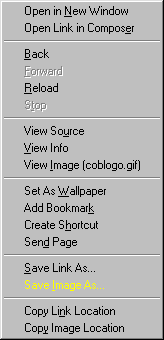
- Place mouse arrow over logo and single right-click
- (Popup Menu will appear)
- Single left-click on the bar 'Save Image As' (Netscape)
- Single left-click on the bar 'Save Picture As' (Explorer)
- Navigate through Window Tree to directory with file name of your choice
Most desktop publishing software (QuarkXpress, Corel WordPerfect, Page Maker, and MS-Word) will allow you to import these images directly into your project and change their size, format, or resolution. If you still need a handy graphic utility to change size or convert formats, try one of the following.


